
Administration Module
The control center for managing, configuring, and operating devices remotely. It allows IT teams to execute remote commands and follow their results, keep programs and operating systems patched with automations, manage mobile devices through EMM, run surveys on the lock screen, provide remote support via remote desktop, organize devices using hierarchical filters, and keep the agent itself up to date across the entire fleet.
Sections
Centralized Control. Simplified Management
Provides centralized control to manage devices remotely, execute commands and see their outcome, patch Windows, Linux and macOS on a schedule, apply policies, deliver technical support through remote access, and organize devices efficiently, simplifying IT operations and improving response times.
-
Remote Commands
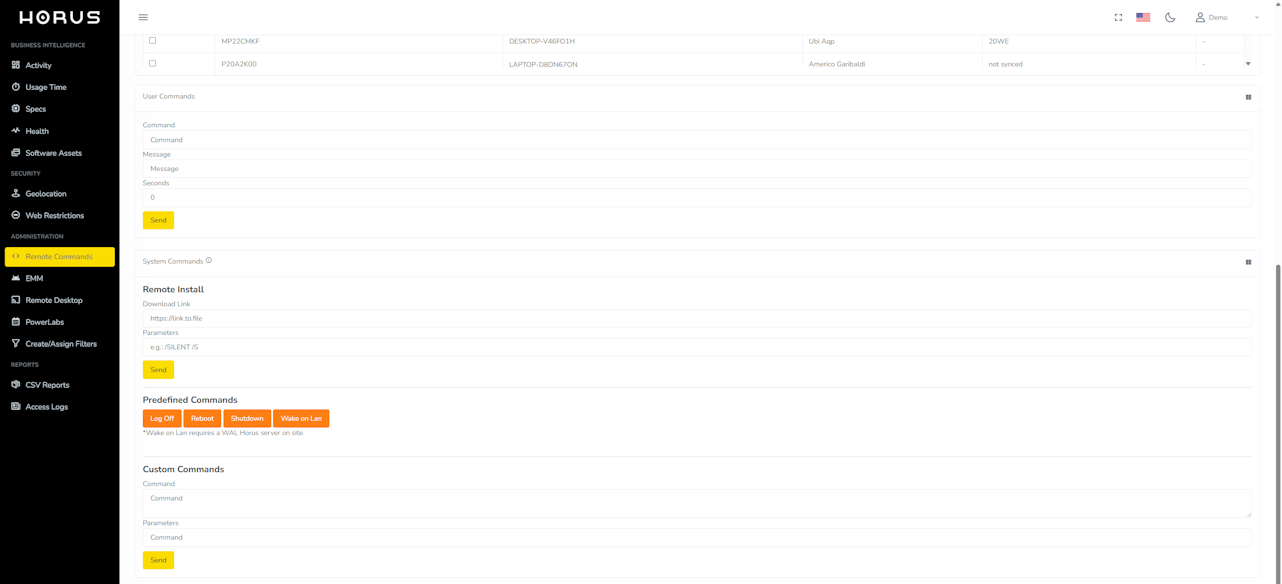
Shutdown, restart, messages, scripts, wallpapers and more, sent to any selection of devices, with a Results tab showing received, completed or failed per machine.
-
Package Manager and Automations
Pending program and OS updates per device (winget, Windows Update, apt, softwareupdate), installed by scheduled automations with scripts and a single reboot.
-
Agent Updates
Publish one agent version and the fleet updates itself, with per-account and per-device switches and a report of every failed update.
-
EMM
Android Enterprise: QR enrollment, policies, managed Google domain upgrade, managed Google Accounts, credential managers and wallpapers.
-
Surveys
Build surveys on the platform, send them by filters and read the answers people give on the lock screen.
-
Remote Desktop
Real-time remote support on Windows computers with an Enterprise or Labs license.
-
PowerLabs
Virtual and hybrid laboratories with remote access to physical computers.
-
Create/Assign Filters
Country, city, institution, level, division and device type hierarchy, plus saved filters, that every page and policy targets.
-
Licensing
Licenses with start and end dates, assigned or freed per device, and the Google Workspace domain for Chromebook enrollment.
-
Helpdesk and User Manual
Support tickets with images and a searchable user manual, both inside the platform.